



Server browser: https://master.cod2x.me/
copyright by Yctn and eyza
CoD2x

CoD2x is a modification of Call of Duty 2. It is build on top of 1.3 version. It focuses on fixing bugs and adding new features to the game.
⚠️ Disclaimer
- The CoD2x patch is a community-made, unofficial modification for Call of Duty 2.
- It is provided free of charge, “as is”, without any warranty of functionality or support.
- You use it entirely at your own risk. The authors are not affiliated with Activision or Infinity Ward and take no responsibility for any issues or damages resulting from its use.
- To use this patch, you must own a legitimate, original copy of Call of Duty 2 purchased from an official distributor.
- This software may be terminated or withdrawn at any time
Version history
2026-04-07 – 1.4.6.8 – current
- 2026-03-27: 1.4.6.7
- 2026-03-25: 1.4.6.6
- 2026-03-24: 1.4.6.5
- 2026-02-22: 1.4.6.4
- 2025-11-18: 1.4.6.3
- 2025-11-06: 1.4.6.2
- 2025-11-04: 1.4.6.1
- 2025-07-25: 1.4.4.6
- 2025-07-12: 1.4.4.5
- 2025-07-04: 1.4.4.4
- 2025-06-27: 1.4.4.3
- 2025-06-23: 1.4.4.2
- 2025-06-20: 1.4.4.1
- 2025-06-08: 1.4.3.5
- 2025-06-06: 1.4.3.4
- 2025-06-06: 1.4.3.3
- 2025-06-02: 1.4.3.2
- 2025-05-25: 1.4.3.1
- 2025-03-06: 1.4.2.3
- 2025-03-02: 1.4.2.2
- 2025-01-23: 1.4.2.1
- 2025-01-23: 1.4.1.1
Features
Changes
- Dialog „Run in safe mode?“ is removed
- Dialog „Set Optimal Settings?“ and „Recommended Settings Update“ is removed
- New text in the console to indicate that CoD2x is loaded
- Changed auto-update server with ability to download the latest version of CoD2x
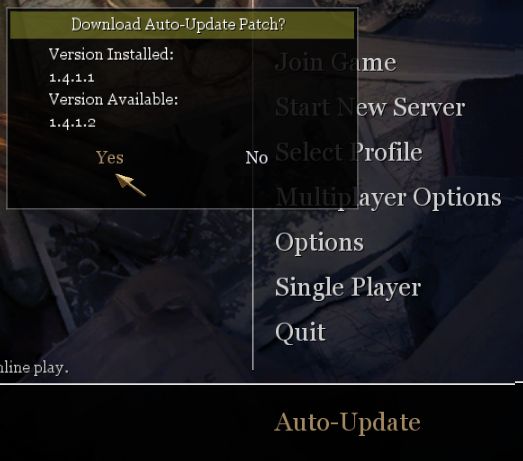
- Ability to connect both original 1.3 servers and new 1.4 servers
- New server errors descriptions when non-compatible clients tried to connect to the server
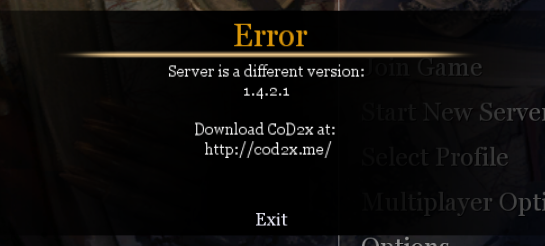
- Fixed black screen on startup – caused by missing microphone / sound device
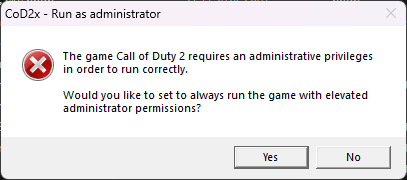
- Added requirement to run the game as administrator to fix problems with VirtualStore folder and the need to have write access into Program Files folder (as it was possible in Windows XP
- Fixed „+smoke“ bug
- Animations – https://www.youtube.com/watch?v=oQkTuwQnI-8
- Reworked the player character animations
- Stance animation
- crouch-prone peak
- crouch-stand peak
- prone-crouch peak
- Stance animation
- Reworked the player character animations
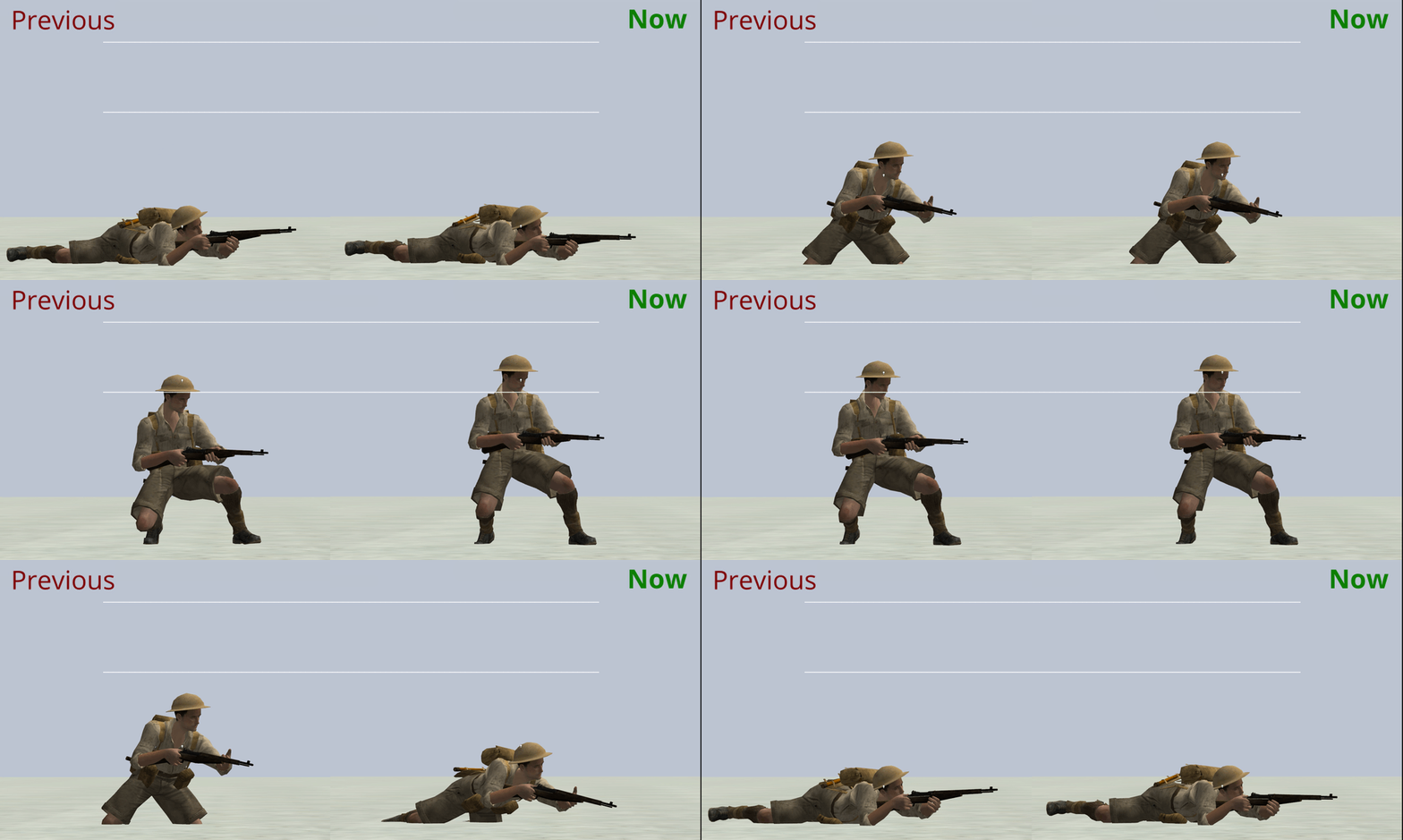
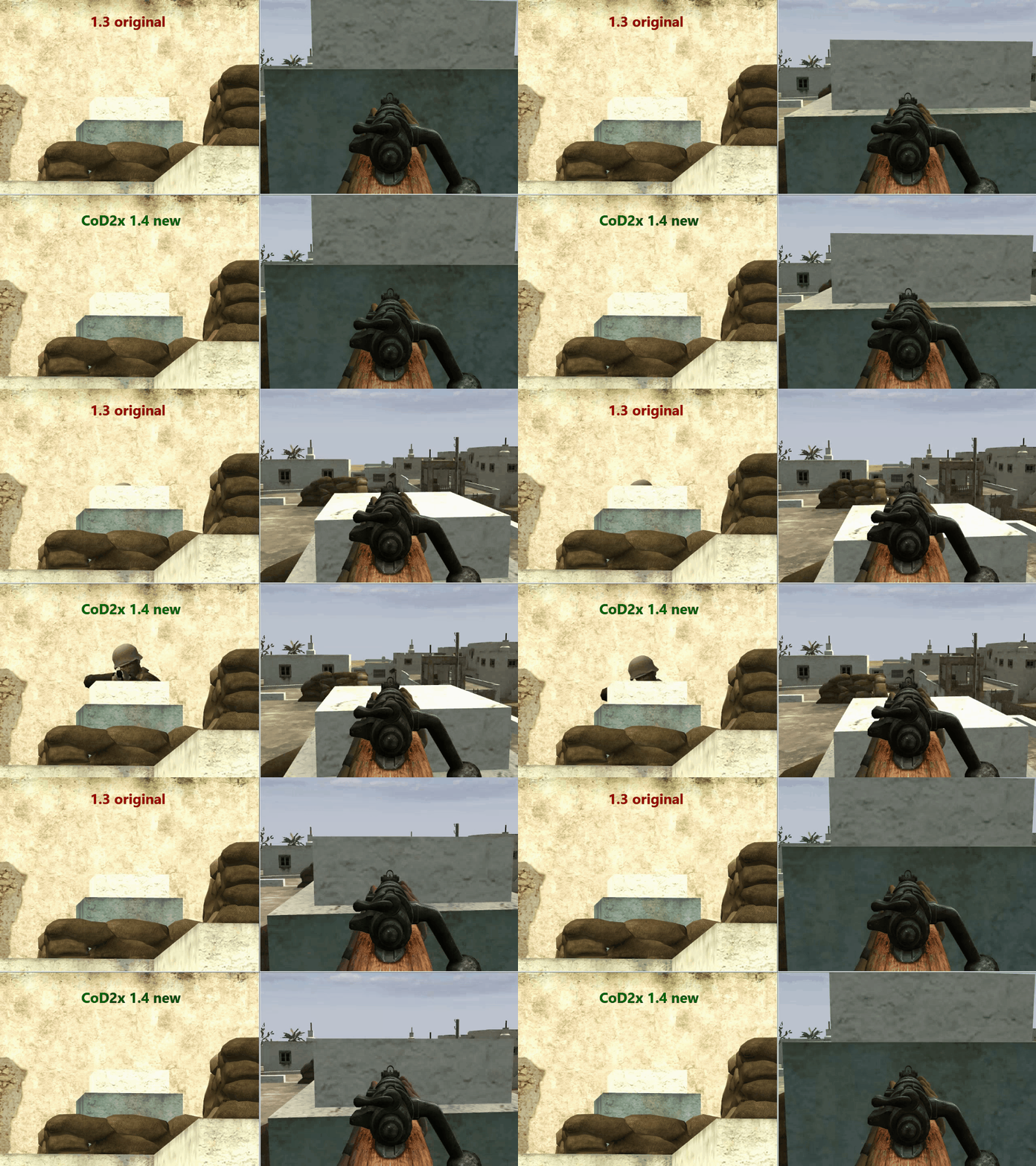
- No leg swing
- Nade throwing animation is canceled imidiately when the player crouches / prones
- Head movement on ladder – head is rotated according to player’s yaw angle
- Prone high body fixed
- Weapon stabilization
- Torso rotation now match the player’s yaw angle
- It fixes weapon „waving“
- It fixes diagonal bug
- Fixed „iwd/sum name mismatch“ error caused by too many iwd files
- Fixed negative protocol number when formating IP and port
- Disabled console prints:
- localized string warning
- Bot warning prints
- „==== ShutdownGame ====“
- „gamename: Call of Duty 2“
- „gamedate: Jun 23 2006“
- Smaller font size of text
- When downloading IWD file
- Text „RECORDING“ in the left bottom corner when recording demo
- Behavior tweaks: automatically set
developer 2andsv_cheats 1when playing demos - Increased number of visible cvars in console
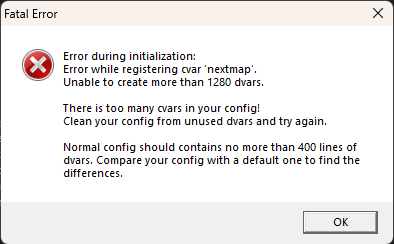
- Increased dvar limit from 1280 to 4096
- DDoS protection via rate limiter for incoming UDP packets
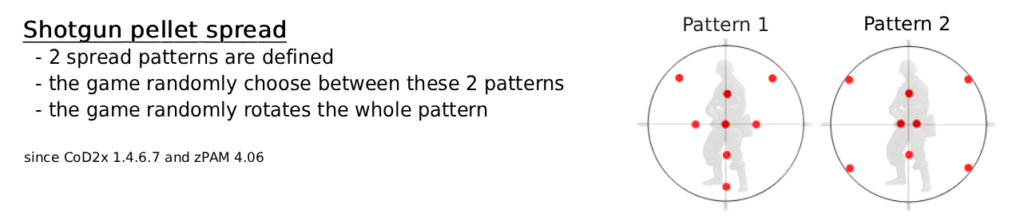
- changeable via new cvar
g_shotgun_spread_fix
Improvements
- Added windowed and borderless window mode:
- windowed mode:
r_fullscreen 0 - borderless mode:
r_fullscreen 0andr_mode [screen resolution] - fullscreen mode:
r_fullscreen 1(default)
- windowed mode:
- Added support for rinput (raw input for mouse movement)
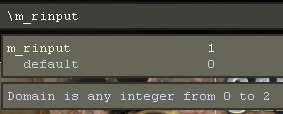
m_rinput 0– turned off, uses Windows cursor possition to get movement (default)m_rinput 1– raw mouse movement, dedicated thread, as external Rinput applicationm_rinput 2– raw mouse movement, integrated directly into the game- The game is also measuring the refresh rate of the mouse:
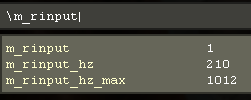
m_rinput_hz– shows the current refresh rate of your mouse in real timem_rinput_max– shows the maximum measured refresh rate- If the external Rinput application is used, the internal
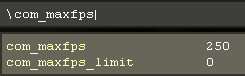
m_rinputis automatically turned off - Added possibility to restrict FPS via mod (like zPAM) into range 125 – 250 using new cvar
com_maxfps_limit(the cvar is cheat protected and can be set only by the server)
- Ignoring custom IWD mods on game start to avoid runtime errors (only files starting with ‚iw_‘ or ‚localized_‘ are loaded)
- Set sv_cheats 1 on disconnect to allow to play demo without the need to do devmap
- Improved error message
recursive error after: Can´t create Dvar 'xxx': 1280 dvars already exist:
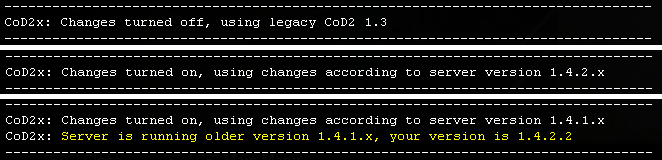
Added informative texts into console with changes that has been applied when connected to the server:
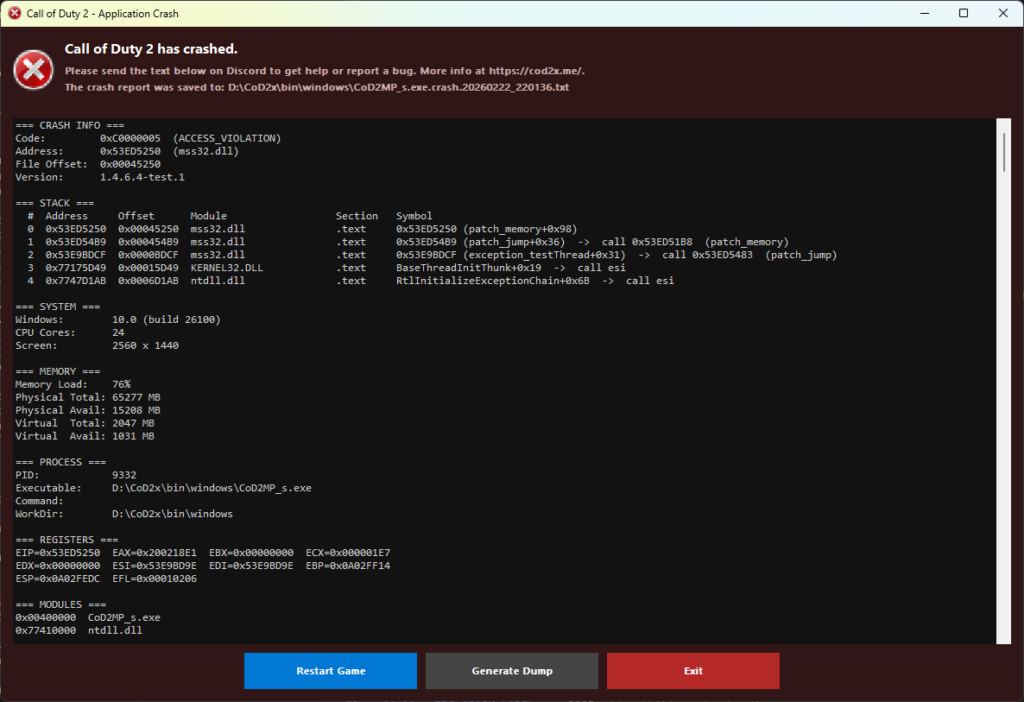
Added crash reporter
Added process freeze detection
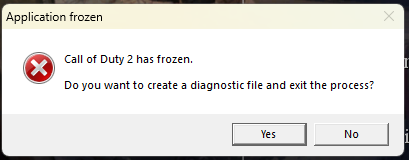
It can be disabled by setting /com_freezeWatch 0
Tickrate
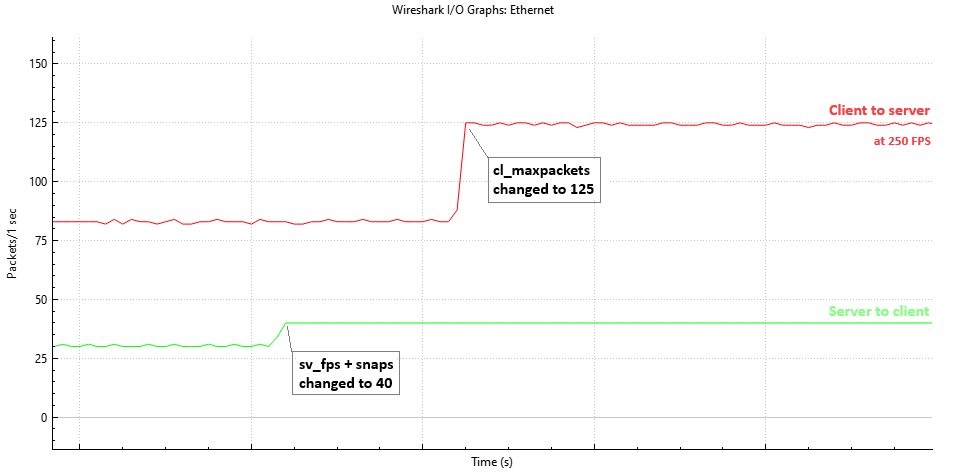
-
- Server FPS maximum increased from 30 to 40 (
sv_fps 40) - Client max snaps increased from 30 to 40 (
snaps 40) - Client max packet value increased from 100 to 125 (
cl_maxpackets 125)- This allows to send exactly 125 packets at 250FPS (instead of ~83.3)
- Server FPS maximum increased from 30 to 40 (
- HWID
- An unique hardware ID is generated for each computer
- The HWID is used to ban cheaters on the server via commands
/banClient <clientId>and/unbanAll(bans are saved in filemain\ban.txt) - The HWID is replacing GUID that was generated by PunkBuster, which is no longer supported
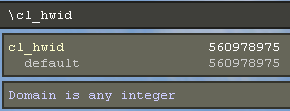
- The HWID is an non-zero unsigned 32-bit integer, like
560978975 - You can see your HWID in the game by checking cvar
/cl_hwid
- Added possibility to change the master via cvars
- client:
cl_masterServer,cl_masterPort - server:
sv_master1,sv_master2,sv_master3sv_master1is forced to becod2master.activision.comsv_master2is forced to bemaster.cod2x.mesv_master3is customizable
- client:
- New cvar
sv_crackedto make the server accept players with invalid CDKEY - New cvar
showPacketStringsto show network communication data - New commands
/increaseand/decreaseto increase or decrease the value of a cvar - Reversed function for third person, added new cvar
cg_thirdPersonMode 1that rotates directly around player without collision with the world - Added possibility to set CPU affinity
com_affinity -1(default) – use maximum available CPU corescom_affinity 0– disable automatically setting CPU affinitycom_affinity <number>– set specified number of cores (e.g.com_affinity 3will use first 3 cores)
- Fixed sounds of invisible players caused by PVS
- Changeable LODs (Level of Detail) for models
r_lodScale <value>r_lodScale 1(default) – original LODsr_lodScale 0.5– better model detail in distancer_lodScale 0– best model detail in distance
- Disabled VirtualStore folder redirection by checking for privileges
- New GSC functions – list in GSC functions
- Match system
- Automatic demo uploading
- Detection of uninitialized sound system
- Radar
- vMIX support
- URL protocol to launch the game from web links:
cod2x:// - Toggle killfeed custom color rendering (
con_printDoubleColors); - Bullet trace debugging (
cg_debugBullets); - Automatic zPAM updates
- Smarter IWD handling and configs: always use
main/config_mp.cfg; improved filtering to prevent sum/name mismatch; for demos only IWDs used at record-time are loaded; for listen servers only the latest zPAM files are loaded; assets inmovieare included for demo playback; automatic extraction ofiw_CoD2x_01.iwd. - Cvar to disable saving changes to config via cvar
com_writeConfig
GSC functions
Level
- `http_fetch` - Fetches data from an HTTP endpoint asynchronously. Allows specifying HTTP method, data, headers, and callbacks for success or error handling.

- `websocket_connect` - Establishes a WebSocket connection to a specified URL with optional headers and callbacks for connection, message, close, and error events.
- `websocket_sendText` - Sends a text message over an active WebSocket connection.
- `websocket_close` - Closes an active WebSocket connection by its connection ID.

- `matchUploadData` - Uploads match-related data to the server with optional callbacks for success or error handling.
- `matchSetData` - Sets global match data using key-value pairs.
- `matchGetData` - Retrieves global match data for a specified key.
- `matchRedownloadData` - Redownloads match-related data from the server.
- `matchClearData` - Clears all match-related progress data.
- `matchIsActivated` - Checks if the match system is currently activated.
- `matchCancel` - Cancels the ongoing match with an optional reason.
- `matchFinish` - Marks the match as finished, kicking all players and performing a fast restart.
Player
- `getIp` - Retrieves the IP address of the player.
- `getHWID` - Retrieves the hardware ID (HWID2) of the player, used for unique identification.
- `getCDKeyHash` - Retrieves the MD5 hash of the player's CD key, which is sent during connection.
- `getAuthorizationStatus` - Retrieves the authorization status of the player's CD key, such as validity or ban status.

- `getViewOrigin` - Retrieves the player's current view origin as a 3D vector.
- `getStance` - Retrieves the player's current stance (e.g., stand, crouch, prone).
- `isUsingTurret` - Checks if the player is currently using a turret.

- `matchPlayerGetData` - Retrieves match-related data for a player using a specified key.
- `matchPlayerSetData` - Sets match-related data for a player using key-value pairs.
- `matchPlayerIsAllowed` - Checks if a player is allowed to join the match based on their credentials.
How to install (client on Windows)
- You need original Call of Duty 2 with version 1.3 installed.
- Download latest version of CoD2x – CoD2x_1.4.6.8_windows.zip
- Extract these files from the archive to the Call of Duty 2 folder, replacing any existing file:
- 📄 mss32.dll
- 📄 mss32_original.dll
- Final structure should look like this:
- 📁 Call of Duty 2
- 📁 Docs
- 📁 main
- 📁 miles
- 📁 pb
- 📄 CoD2MP_s.exe
- 📄 CoD2SP_s.exe
- 📄 gfx_d3d_mp_x86_s.dll
- 📄 gfx_d3d_x86_s.dll
- 📄 mss32.dll
- 📄 mss32_original.dll
- 📄 … (other files)
- 📁 Call of Duty 2
- The archive also contains additional files that are not required to be installed:
- 📄 CoD2x Installation and uninstallation manual.txt
How to uninstall (client on Windows)
- Delete the following files:
- 📄 mss32.dll
- Rename following file:
- 📄 mss32_original.dll -> 📄 mss32.dll
How to install (server on Linux)
- Download latest version of CoD2x – CoD2x_1.4.6.8_linux.zip
- Extract this file from the archive to the Call of Duty 2 folder:
- 📄 libCoD2x.so
- Final structure should look like this:
- 📁 Call of Duty 2
- 📁 main
- 📁 pb
- 📄 cod2_lnxded
- 📄 libCoD2x.so
- 📁 Call of Duty 2
- The archive also contains additional files that are not required to be installed:
- 📄 CoD2x Installation and uninstallation manual.txt
- 📄 cod2_lnxded (official 1.3 game version)
- Update chmod for the libCoD2x.so file to be executable:
chmod +x libCoD2x.so
- Run the game with LD_PRELOAD, for example:
LD_PRELOAD=./libCoD2x.so ./cod2_lnxded +set dedicated 2 +exec server.cfg- 🛈 Its not common that server providers support adding this, only server administrators can do that.
- Auto-update is enabled by default. Make sure to enable UDP port 20720. If you want to disable auto-update, set
sv_update "0"or disable UDP port 20720. On server start, the server will check for the latest version of CoD2x and download it if available. File libCoD2x.so will be replaced with the latest version. Process restart is needed to apply the update.
- Delete the following files:
- 📄 mss32.dll
- Rename following file:
- 📄 mss32_original.dll -> 📄 mss32.dll
How to run server
On Windows
- Create a shortcut of CoD2MP_s.exe
- Right click on the shortcut, select „Properties“
- In the „Target“ field, add following parameters at the end of the path:
+set dedicated 2 +exec server.cfg
- Click „OK“
- Run the shortcut to start the server
On Linux
- Open terminal
- Navigate to the Call of Duty 2 folder
- Run the server with following command:
LD_PRELOAD=./libCoD2x.so ./cod2_lnxded +set dedicated 2 +exec server.cfg
Administrator rights
Since version 1.4.4.6, the game does not require administrator rights to run if the game is located in folder outside of Program Files.
If the game is located in Program Files, you need to run the game as administrator to avoid problems with VirtualStore folder.
The VirtualStore folder is a feature introduced in Windows Vista and later to provide compatibility for legacy applications that try to write files to protected system locations, such as C:\Program Files. When a program without administrator rights attempts to write to these folders, Windows silently redirects the write operations to a user-specific location.
This allows older applications to run without errors, but it can cause confusion because files may not be where the application or user expects them to be. For example, config files and IWD files might end up in the VirtualStore folder instead of the actual game directory.
Possible locations for the game:
C:\Program Files\Activision\Call of Duty 2C:\Program Files (x86)\Activision\Call of Duty 2C:\Users\<username>\AppData\Local\VirtualStore\Program Files\Activision\Call of Duty 2C:\Users\<username>\AppData\Local\VirtualStore\Program Files (x86)\Activision\Call of Duty 2
Possible locations for the game in registry:
HKEY_LOCAL_MACHINE\SOFTWARE\Activision\Call of Duty 2HKEY_LOCAL_MACHINE\SOFTWARE\Wow6432Node\Activision\Call of Duty 2HKEY_CURRENT_USER\SOFTWARE\Classes\VirtualStore\MACHINE\SOFTWARE\Activision\Call of Duty 2HKEY_CURRENT_USER\SOFTWARE\Classes\VirtualStore\MACHINE\SOFTWARE\Wow6432Node\Activision\Call of Duty 2
In CoD2x, we check for write access to the game folder on startup. If the game is located in Program Files and the user does not have write access, we show a error message box:
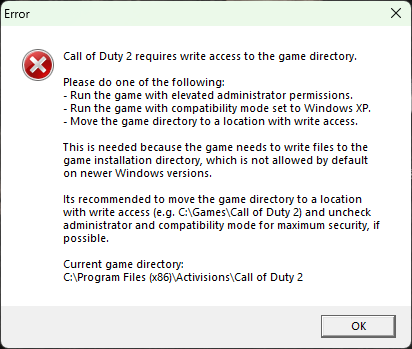
Running the game as administrator will fix this problem, but it decreases the security of the system. Thats why we recommend to move the game to a different folder, such as C:\Games\Call of Duty 2 and uncheck the „Run as administrator“ option and compatibility mode in the properties of the game executable, if possible.
Why its recommended to uncheck also compatibility mode? Compatibility mode also runs the game with administrator rights.
Try to run the game without administrator and compatibility mode first, and if it works without problems, you can leave it that way. If you encounter problems with the game, you can try to run the game with compatibility mode, but you decrease the security of your system.
In registry, when the game runs with administrator rights, we are moving old values from VirtualStore to the original location, so the game always uses the latest saved values.